Web Scraping with Python: A Complete Beginner-Friendly Tutorial
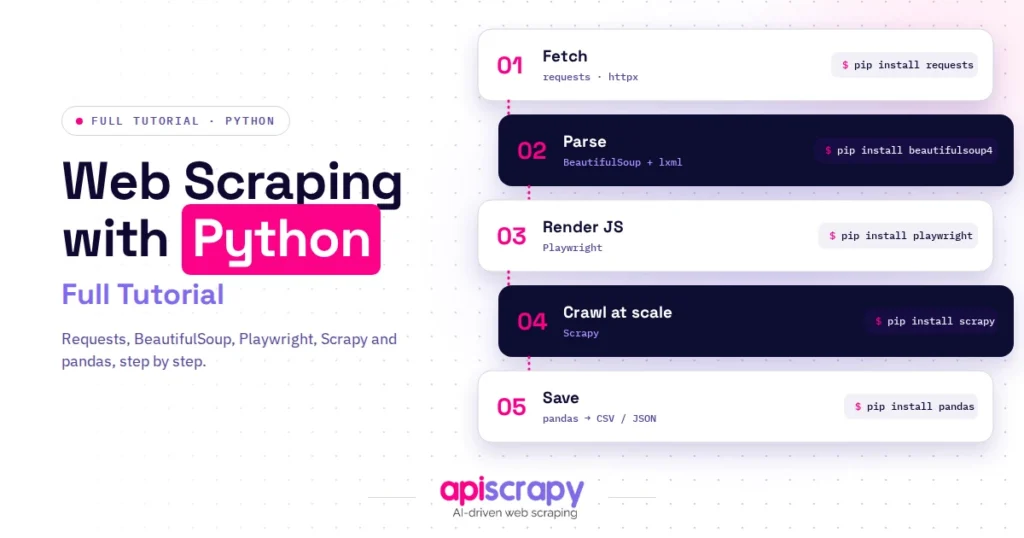
- Install requests, beautifulsoup4, and lxml inside a virtual environment.
- The core loop is fetch, parse, extract, and save to CSV.
- Use browser Inspect to find elements, and prefer stable ids over auto-generated class names.
- html.parser is a solid default, lxml is faster for bulk jobs, and html5lib rescues broken HTML.
- Use Playwright for JavaScript pages, and a scraping API or managed service for recurring, high-volume data.
- Scraping public data is not automatically illegal, but terms of service and privacy laws can apply.
Introduction: Why Web Scraping With Python Matters
Copying data from websites by hand is slow, error-prone, and impossible to repeat at scale. Web scraping with Python fixes that by turning any public web page into structured data you can analyze, store, and reuse.
This tutorial walks you through the full process, from installing libraries to choosing between code, parsers, and a managed API. Every step includes code you can run today.
What you will learn:
- How to install the right Python libraries and set up a clean environment
- How to send requests, parse HTML, and save results to CSV
- How to target the exact elements you want with CSS selectors
- How to choose between libraries, parsers, and a scraping API
All code uses Python 3 with the requests and beautifulsoup4 libraries. It targets books.toscrape.com, a practice website built for learning to scrape.
APISCRAPY is our own managed web scraping service and appears in the API section. We keep the comparison neutral.
Need web data without maintaining scrapers or proxies? Book a demo with APISCRAPY and get structured data delivered on schedule.
Want to Scrape Text From a Website? Here’s How to Do It
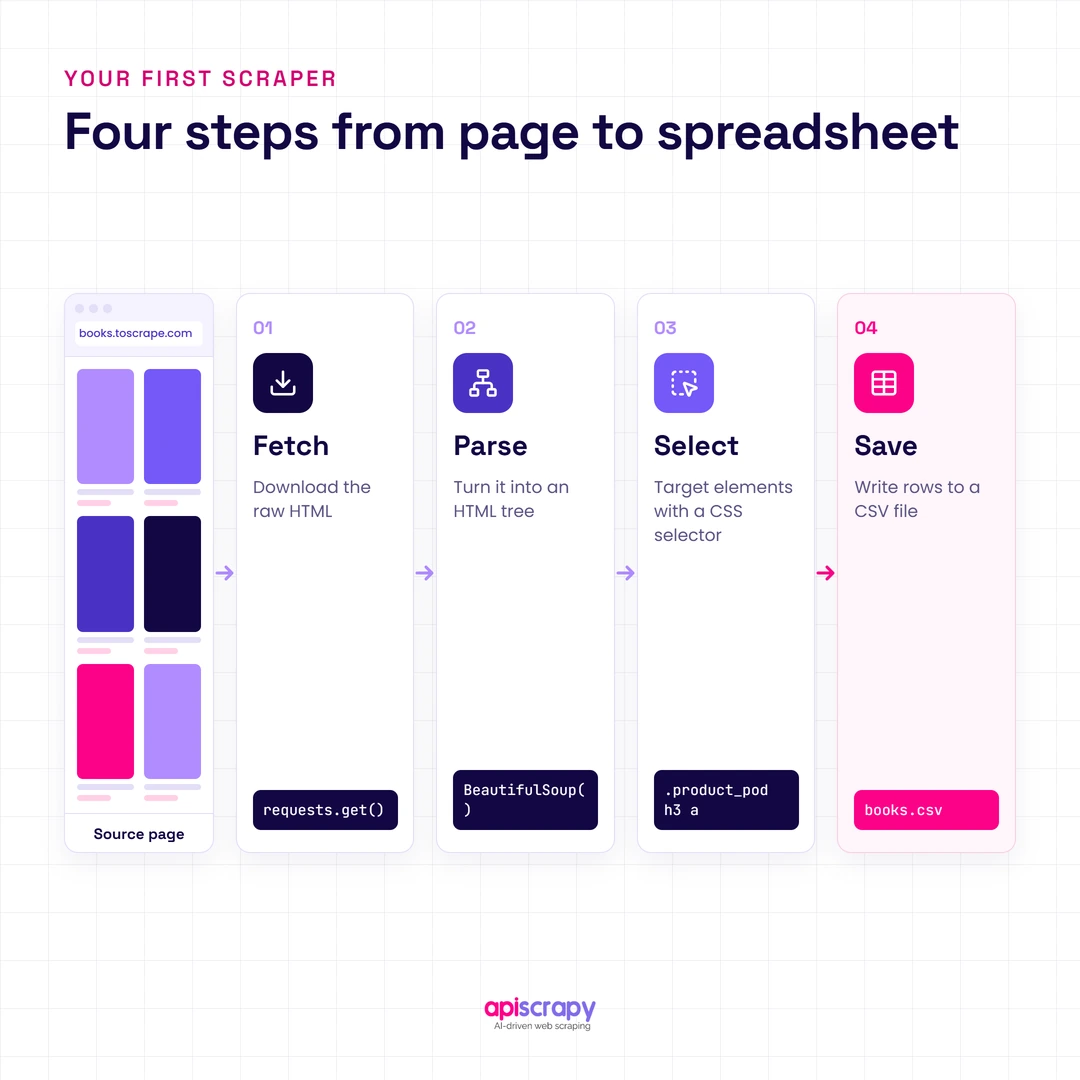
To scrape text from a website with Python, send an HTTP request with the requests library, parse the HTML with BeautifulSoup, select the elements that hold your text, and save the results to a CSV or JSON file.
In practice, the whole job comes down to four moves:
- Fetch the page with requests.get().
- Parse the HTML into a searchable tree.
- Select the elements you want with CSS selectors.
- Save the extracted text to a file.
The sections below turn each move into working code. If you only need a handful of pages, you can finish this tutorial in under an hour.
How to Scrape Websites With Python: A Step-by-Step Guide With Code
You need Python 3.9 or newer and a terminal. The four steps below build on each other, so run them in order.
Step 1: Install Your Scraping Libraries
Start with a virtual environment so your scraping libraries stay separate from other projects. Then install three packages: requests (fetches pages), beautifulsoup4 (parses HTML), and lxml (a fast parser).
python -m venv scraper-env

source scraper-env/bin/activate # On Windows: scraper-env\Scripts\activate

pip install requests beautifulsoup4 lxml
Run pip list to confirm all three appear. If a command fails, check that you are inside the activated environment.
Step 2: The Core Workflow (With Code)
Every scraper follows the same loop: request, parse, extract, save. This script collects book titles, prices, and stock status from the first page, then writes them to a CSV file.
import csv

import requests

from bs4 import BeautifulSoup

URL = "https://books.toscrape.com/"

HEADERS = {"User-Agent": "Mozilla/5.0 (compatible; learning-scraper/1.0)"}

response = requests.get(URL, headers=HEADERS, timeout=30)

response.raise_for_status() # Stop on 403, 404, 500 errors

# Use .content so BeautifulSoup detects the encoding itself

soup = BeautifulSoup(response.content, "html.parser")

rows = []

for book in soup.select("article.product_pod"):

title = book.h3.a["title"]

price = book.select_one("p.price_color").get_text(strip=True)

stock = book.select_one("p.instock").get_text(strip=True)

rows.append({"title": title, "price": price, "availability": stock})

with open("books.csv", "w", newline="", encoding="utf-8") as f:

writer = csv.DictWriter(f, fieldnames=["title", "price", "availability"])

writer.writeheader()

writer.writerows(rows)

print(f"Saved {len(rows)} books")
Open books.csv and you should see one row per book. A page of this site holds 20 books, so expect 20 rows.
A practical tip: pass response.content to BeautifulSoup instead of response.text. Requests sometimes guesses the wrong encoding, and prices then show up as “£51.77” instead of “£51.77”.
To scrape more than one page, follow the “next” link until it disappears. Add a short pause between requests so you never hammer the server.
import time

from urllib.parse import urljoin

url = "https://books.toscrape.com/"

all_rows = []

while url:

response = requests.get(url, headers=HEADERS, timeout=30)

response.raise_for_status()

soup = BeautifulSoup(response.content, "html.parser")

for book in soup.select("article.product_pod"):

all_rows.append(book.h3.a["title"])

next_link = soup.select_one("li.next a")

url = urljoin(url, next_link["href"]) if next_link else None

time.sleep(1) # Be polite: one request per second

print(f"Collected {len(all_rows)} titles")
Step 3: How to Target the Right HTML Elements
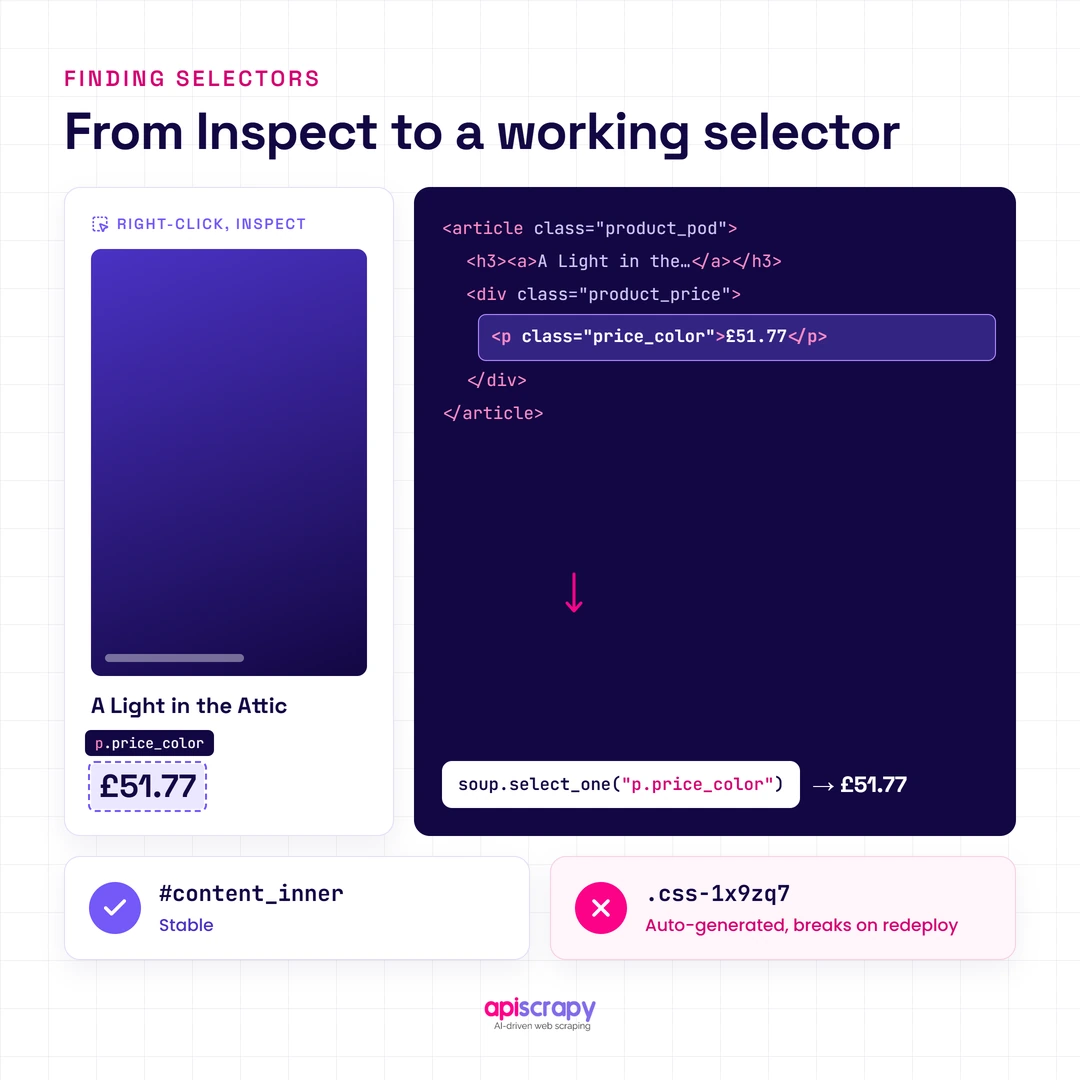
The hardest part of scraping is not the code. It is finding the right element. Open the page in your browser, right-click the data you want, and choose Inspect to see its tag, class, and position in the HTML.
Then translate what you see into a CSS selector. BeautifulSoup’s select() and select_one() accept the same selectors you would write in a stylesheet.
| Selector type | Example | What it matches |
|---|---|---|
| Tag | h3 |
Every h3 element |
| Class | p.price_color |
Paragraphs with the class price_color |
| ID | #content_inner |
The element with that id |
| Nested | article.product_pod h3 a |
Links inside a product’s h3 |
| Attribute | a[href*="catalogue"] |
Links whose href contains “catalogue” |
heading = soup.select_one("h1").get_text(strip=True) # One element

prices = soup.select("p.price_color") # A list of elements

first_link = soup.select_one("article.product_pod h3 a")["href"] # An attribute
Prefer stable attributes, such as ids and semantic tags, over long chains of auto-generated class names. Those generated names change whenever a site redeploys, and they are the number one reason scrapers break.
Step 4: Choose the Right Scraping Tool for the Job
No single library fits every project. Match the approach to the page type and the volume you need.
| Approach | Best for | Main limitation |
|---|---|---|
| requests + BeautifulSoup | Static pages, small projects | Cannot run JavaScript |
| Scrapy | Large crawls with many pages | Steeper learning curve |
| Playwright or Selenium | JavaScript-rendered pages | Slower and heavier to run |
| Scraping API or managed service | Scale, blocks, and CAPTCHAs | Ongoing cost |
A simple rule works well: start with requests and BeautifulSoup, and move up only when you hit a real limit.
How Does Web Scraping With Python Actually Work?
Web scraping with Python automates what your browser does, then reads the result with code instead of your eyes. Your script sends a request to a server, the server returns HTML, and your code pulls out the parts you need.
That HTML is a tree of nested elements. A parser turns the raw text into a structure Python can search, which is why selectors like article.product_pod h3 a work.
The type of page changes the approach. Static pages ship their data inside the HTML, so requests and BeautifulSoup are enough. JavaScript-rendered pages build their content in the browser after loading, so you need a headless browser or an API that renders for you.
A complete scraping pipeline has four stages:
- Fetch: request the page and handle errors.
- Parse: convert HTML into a searchable tree.
- Clean: trim whitespace, fix encodings, and standardize formats.
- Store: write to CSV, JSON, or a database.
Legal and Ethical Things to Consider Before Web Scraping
Scraping public data is not automatically illegal, but it is not automatically safe either. A site’s terms of service, copyright rules, and privacy laws can all apply to what you collect and how you use it.
Follow these habits on every project:
- Check robots.txt at /robots.txt to see which paths the site asks crawlers to avoid.
- Read the terms of service before any commercial use.
- Rate limit your requests so you never strain the server.
- Skip personal data such as private emails, phone numbers, or profiles.
- Use an official API or data feed when one exists.
This is general information, not legal advice. Talk to qualified counsel before you build a commercial data product.
How to Use an HTML Parser for Web Scraping in Python
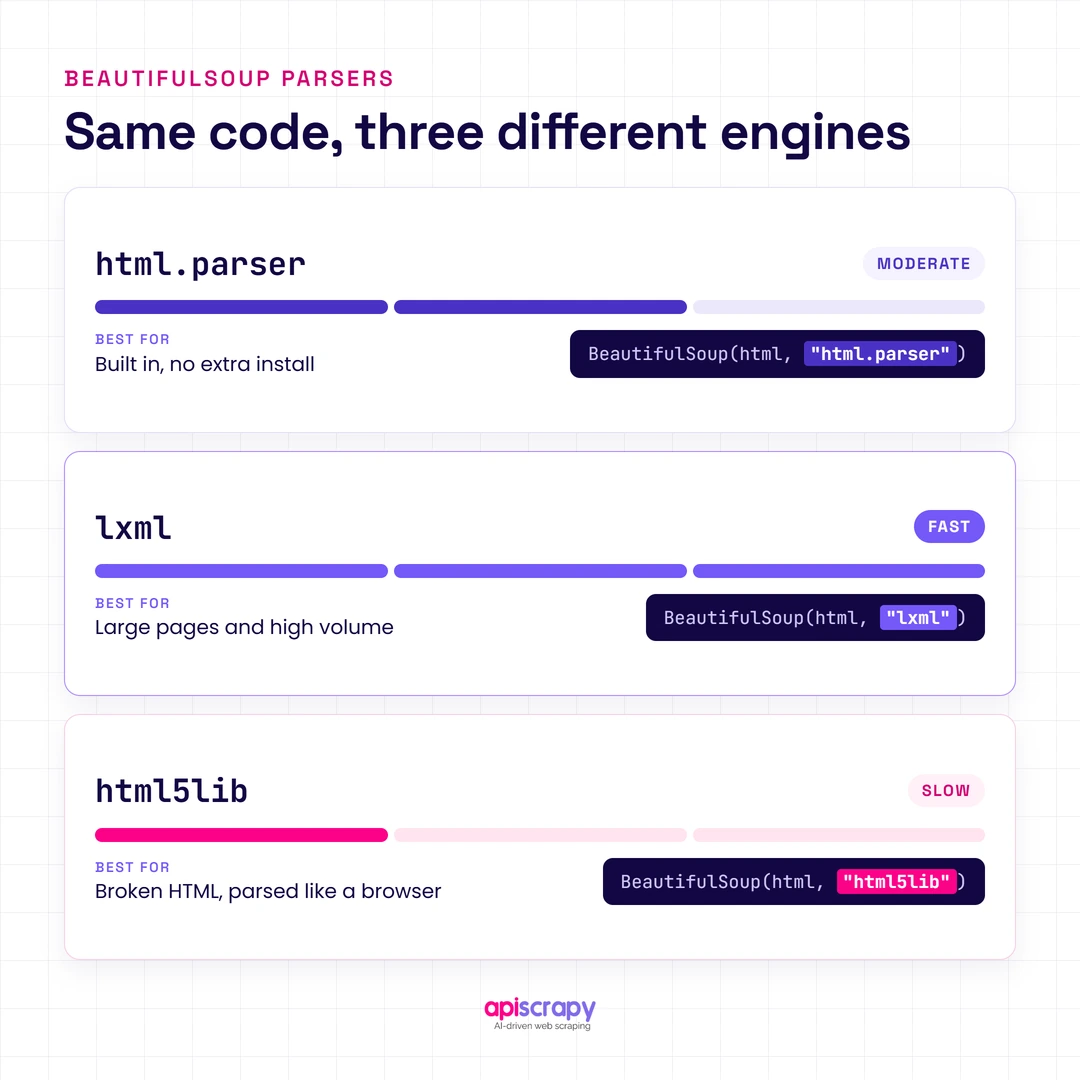
An HTML parser reads raw markup and builds a tree your code can search. BeautifulSoup does not parse on its own. It wraps a parser you choose, and that choice affects speed and how it handles messy HTML.
| Parser | Speed | Best for |
|---|---|---|
| html.parser | Moderate | Built in, no install, good default for beginners |
| lxml | Fast | Large pages and bulk jobs |
| html5lib | Slow | Badly broken HTML, parses like a browser |
Switching parsers takes one word. This example uses lxml to pull every book link on a page.
from bs4 import BeautifulSoup

soup = BeautifulSoup(response.content, "lxml") # Only this argument changes

links = [a["href"] for a in soup.select("article.product_pod h3 a")]

print(links[:5])
A parser only sees the HTML the server sends. If the data appears in your browser but not in your parsed output, the page likely loads it with JavaScript. In that case, check the page source for embedded JSON or a script tag of type application/ld+json, which is often easier and more stable to read than visual elements.
When HTML is broken, try html5lib before you write complicated workarounds. It is slower, but it often recovers content the other parsers drop.
Don’t Want to Manage Browsers and Proxies? Try a Python Web Scraping API
A basic script works fine for a few pages. At scale, the real work shifts to blocks, CAPTCHAs, proxy rotation, and selectors that break every time a site changes its layout.
A Python web scraping API removes that load. You send a URL, and the service returns clean, structured data.
The call looks like any other request in Python. The endpoint below is a placeholder, so swap in the details from your provider’s documentation.
import requests

API_ENDPOINT = "https://api.example-scraping-service.com/v1/extract" # Placeholder

API_KEY = "YOUR_API_KEY"

payload = {

"url": "https://books.toscrape.com/",

"render_js": True, # Ask the service to render JavaScript

"format": "json",

}

headers = {"Authorization": f"Bearer {API_KEY}"}

response = requests.post(API_ENDPOINT, json=payload, headers=headers, timeout=60)

response.raise_for_status()

print(response.json())
A good scraping API or managed service typically handles:
- Proxy rotation and geo-targeting so requests look like normal traffic from the right region.
- CAPTCHA and bot-challenge handling without manual work.
- Retries and uptime monitoring so one failed request never ruins a full run.
An API beats a DIY script when you need recurring data, high volume, or pages that fight back. It costs more per page than your own code, but it saves the engineering hours you would spend on maintenance.
APISCRAPY’s managed web scraping service covers collection, anti-bot resilience, and delivery of structured data on a schedule. It suits teams that want the data, not the upkeep.
How to Choose the Right Web Scraping Approach
Three factors decide the right approach: how many pages you need, how technical your team is, and how much time you can spend on maintenance. Use the table as a starting point.
| Your situation | Recommended approach | Why |
|---|---|---|
| A few static pages, one-off task | requests + BeautifulSoup | Fast to build, free, easy to debug |
| Thousands of pages, static HTML | Scrapy | Built-in crawling, queues, and pipelines |
| JavaScript-heavy pages | Playwright or Selenium | Renders pages like a real browser |
| Recurring, high-volume data | Scraping API or managed service | Handles blocks, proxies, and upkeep |
| No developers available | No-code or managed service | Skips code and maintenance entirely |
A good rule of thumb: code it yourself for small, one-time jobs, and hand off anything recurring. The hidden cost of DIY scraping is not the first script. It is the engineering time you spend fixing it every month.
Start Building Your Web Crawler Today
Conclusion
You now know how web scraping with Python works, from installing libraries and parsing HTML to choosing between code, parsers, and a managed API. Start small with requests and BeautifulSoup, then move up only when volume or blocks demand it.
Pick your route by project size and skill level. A handful of pages is a weekend script, while recurring, large-scale collection is usually cheaper to hand off than to maintain.
Need web data without maintaining scrapers or proxies? Book a demo with APISCRAPY and get structured data delivered on schedule.
FAQs
Can ChatGPT do web scraping?
It can help you write and debug scraping code, but it is not built for reliable, repeatable extraction at scale. For recurring jobs, use a script, a scraping API, or a managed service.
Is Python good for web scraping?
Yes. Its readable syntax and libraries like requests, BeautifulSoup, Scrapy, and Playwright cover almost every scraping need.
Is it illegal to scrape a website?
Not automatically, but terms of service, copyright, and privacy laws can apply. Check them first and consult counsel for commercial projects.
Is web scraping with Python easy?
Basic scraping is beginner-friendly and takes a few lines of code. JavaScript pages, scale, and blocks are where it gets harder.