How to Scrape Indeed.com Job Data

Indeed is one of the largest job boards in the world, which makes it a rich source of hiring signals. Recruiters scrape it for leads, analysts use it to benchmark salaries, and researchers track which skills employers want right now.
How these methods were evaluated:
- Test runs of the no-code extension and a Python script against live Indeed search pages
- A review of Indeed’s robots.txt, terms of service and anti-bot behavior
- Practitioner discussions on scraping forums about what breaks in real projects
APISCRAPY is a managed web scraping service and is included below as one option. The comparison is kept neutral.
The goal is simple: help you pick the method that fits your volume, budget and skills, whichever one you choose.
How to Scrape Indeed Job Listings and Export to CSV
The no-code route suits recruiters, analysts and small teams who want a clean CSV without writing code. You need Chrome and about ten minutes.
Step 1: Install the Extension and Navigate to Indeed
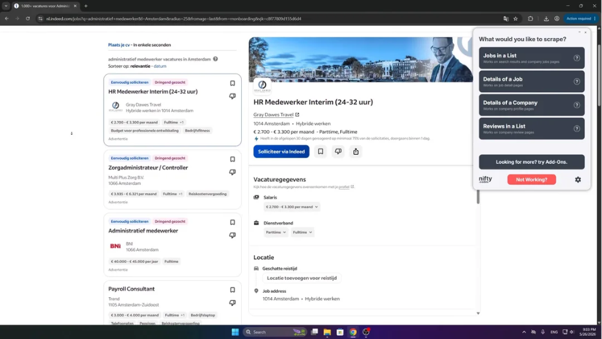
Install the Indeed Scraper extension from the Chrome Web Store. Open Indeed and run a job search, for example “data analyst” in your target city. An overlay panel appears on the right side of the page.
Step 2: Select the Scraping Mode
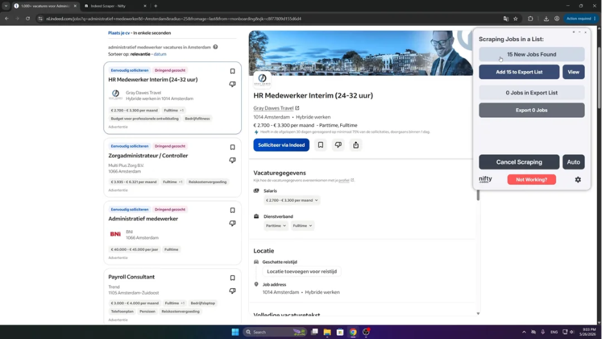
Click Jobs in a List in the overlay panel. The extension detects the job cards on the page and fills a data table inside the panel. Compare a few rows with the page to confirm the fields match.
Step 3: Load More Data with Auto-Scroll
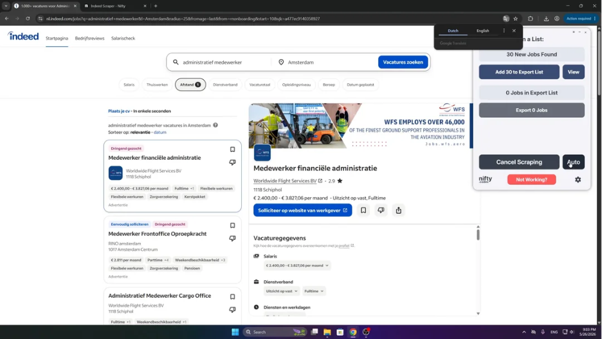
Scroll down manually to load more jobs, or click Auto. The extension moves through multiple pages of search results and adds new jobs to the list. Click Stop when you have enough data.
Start with two or three pages first. It is easier to fix a wrong field early than after a long run.
Step 4: Customize the Data Fields
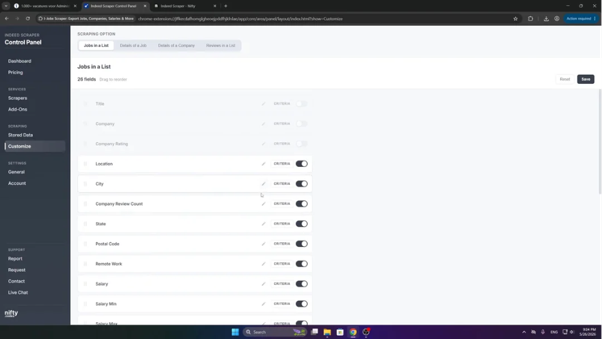
Click Customize, then select Jobs in a List. Uncheck columns you do not need, drag fields to reorder them, or rename headers to match your spreadsheet. Click Save to apply the changes.
Step 5: Manage Stored Data
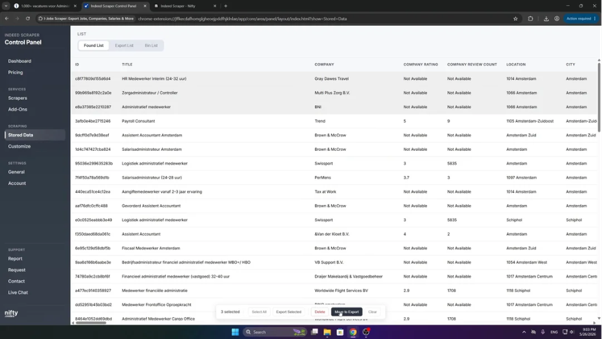
Open the Settings menu and click Store Data. Review the collected listings, then delete unwanted rows or move selected rows to the export queue. Removing duplicates here saves cleanup work later.
Step 6: Export the Job Listings
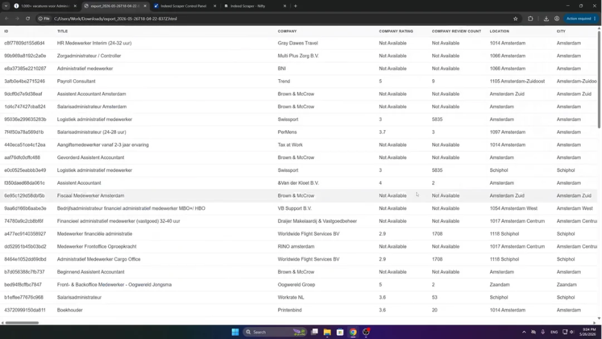
Click Add to export list, then Export. Choose CSV, Excel, JSON or HTML to download the file to your computer.
What Data Can You Extract from Indeed?
The exact fields depend on what Indeed shows on each listing. Typical columns include:
- Job title and company name
- Location and work type (on-site, hybrid or remote)
- Salary range, when the employer publishes one
- Job type, such as full-time or contract
- Posting date and job URL
Here is what an exported CSV can look like (illustrative sample):
job_title,company,location,salary,job_type,posted,url
Data Analyst,Example Co,"Austin, TX",$70K-$85K,Full-time,2 days ago,https://www.indeed.com/viewjob?jk=EXAMPLE
Where extensions fall short: they run manually, they hit volume limits, and they can break when Indeed changes its page layout. For recurring or large projects, you need a more robust method.
How to Scrape Indeed Without Getting Blocked
Indeed sits behind Cloudflare protection, so a plain HTTP request often returns a 403 error or a “Just a moment” challenge page. Scraping guides from Scrapfly and several Apify listings report the same pattern: datacenter IPs get blocked almost immediately.
Why Indeed blocks scrapers: rate limiting, IP reputation checks, browser fingerprinting and challenge pages that only a real browser can pass.
How to scrape Indeed without getting blocked:
- Rotate residential proxies. Residential IPs look like ordinary visitors, while datacenter ranges get flagged fast. Match the proxy country to the Indeed domain you target.
- Use realistic browser headers. Send a current user agent and consistent language headers, so each request looks like it came from one real browser.
- Slow down and randomize. Add random delays between pages. Identical timing between requests is an easy bot signal.
- Use a real browser for challenged pages. A headless browser such as Playwright, with stealth settings, can pass JavaScript checks that plain requests cannot.
- Retry on a fresh session. When a page is blocked, retry with a new IP and clean cookies instead of repeating the same request.
- Split large searches. Indeed caps a single search at about 1,000 results, so break big jobs into smaller searches by location, title and date posted.
Even with all of this, expect upkeep. Maintainers of open-source job scrapers openly note that bot-detection changes can break a working script within weeks.
The managed option: a service like APISCRAPY handles proxy rotation, challenge solving and maintenance for you. You receive structured Indeed job data instead of managing infrastructure, which saves the most time on recurring or large projects.
Can You Scrape Indeed with Python?
Yes. Python is the most common route for developers. Requests and BeautifulSoup work for static pages, but Indeed’s challenge pages usually need a real browser such as Playwright or Selenium.
How to scrape Indeed with Python:
- Open the search URL in a headless browser.
- Wait for the job cards to load, then grab the page HTML.
- Parse the title, company and location from each card.
- Handle pagination, then save the rows to CSV.
Install the packages first:
pip install playwright beautifulsoup4

playwright install chromiumimport csv
from bs4 import BeautifulSoup
from playwright.sync_api import sync_playwright
URL = “https://www.indeed.com/jobs?q=data+analyst&l=Austin%2C+TX”
with sync_playwright() as p:
browser = p.chromium.launch(headless=True)
page = browser.new_page()
page.goto(URL, timeout=60000)
page.wait_for_selector(“div.job_seen_beacon”, timeout=15000)
html = page.content()
browser.close()
soup = BeautifulSoup(html, “html.parser”)
rows = []
for card in soup.select(“div.job_seen_beacon”): # selectors change often
title = card.select_one(“h2.jobTitle span”)
company = card.select_one(“[data-testid='company-name']”)
location = card.select_one(“[data-testid='text-location']”)
rows.append([
x.get_text(strip=True) if x else “”
for x in (title, company, location)
])
with open(“indeed_jobs.csv”, “w”, newline="", encoding="utf-8") as f:
writer = csv.writer(f)
writer.writerow([“job_title”, “company”, “location”])
writer.writerows(rows)Treat this as a starting point. From a normal home or office connection it may work for a few pages. At volume, expect a challenge page, so add the residential proxies and delays covered above.
Limitations of the Python approach:
- Frequent blocks without proxies, retries and browser stealth settings
- Constant maintenance, because CSS selectors break whenever Indeed changes its markup
- Rising cost and complexity once you scale to thousands of listings
Which method should you choose?
| Method | Effort | Best for | Upkeep |
|---|---|---|---|
| Chrome extension | Low | Quick, one-off exports | Low, but manual runs |
| Python script | High | Custom logic and developers | High |
| Managed service (APISCRAPY) | Low | Recurring, large-scale data | Handled for you |
Does Indeed Allow Scraping?
Not officially. Indeed’s terms of use restrict automated data collection, and its robots.txt file limits what crawlers may access. Read both on the day you start, since they change.
Is it illegal, then? The answer is more nuanced than yes or no. In hiQ Labs v. LinkedIn, the Ninth Circuit held that scraping publicly accessible data does not count as unauthorized access under the US Computer Fraud and Abuse Act. But the same case ended with hiQ losing on breach of contract, because it had broken the site’s terms. In short: public data is not automatically a crime to collect, but violating terms can still bring civil trouble, such as blocked access or legal claims.
Responsible scraping practices:
- Collect only public listing data, and never go behind a login or bypass access controls
- Keep request rates low so you do not strain Indeed’s servers
- Avoid personal data, such as recruiter names or contact details, unless you have a lawful basis under GDPR or CCPA
This is general information, not legal advice. For commercial projects, ask a qualified lawyer to review your use case. Managed services such as APISCRAPY focus on publicly available data, which keeps compliance questions simpler.
Start Building Your Web Crawler Today
Conclusion
You can scrape Indeed job data three ways. A Chrome extension is quickest for a one-off CSV. Python gives developers full control at the cost of constant upkeep. A managed service is the practical choice when you need fresh data at scale. Choose by volume, budget and technical skill, and always stay within Indeed’s terms and the law.
If you need reliable Indeed job data without blocks, proxies or maintenance, APISCRAPY can deliver it clean and structured.
Book a demo with APISCRAPY to see how it fits your hiring, salary or market research workflow.
Frequently Asked Questions About Scraping Indeed
Can you legally scrape Indeed?
Collecting public data is not a crime under US precedent such as hiQ v. LinkedIn, but Indeed's terms restrict scraping, so blocks or civil claims are possible. Get legal advice for commercial use.
Can you scrape Indeed with Python?
Yes, using Playwright or Selenium with BeautifulSoup. Without proxies and regular maintenance, expect blocks and broken selectors.
How does Indeed know if you applied to a job?
Indeed records applications made through its own apply flow while you are signed in. Scraping listings does not submit or log an application.
What is the easiest and cheapest way to scrape job postings from multiple job portals?
Use a no-code extension for small one-off exports. For several portals on a regular schedule, a managed service like APISCRAPY avoids building and maintaining a separate script for each site.