Web Scraping vs API: Which One Should You Use ?
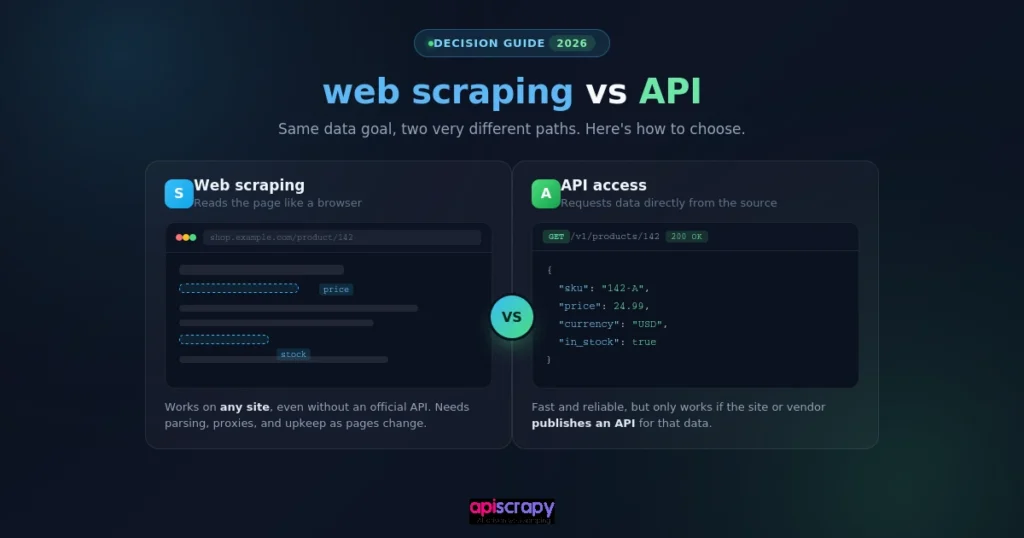
Every data-driven team eventually faces the same choice: scrape the page or call an API instead. This guide compares both methods side by side to help you choose confidently.
- The decision comes down to sanctioned access, not preference. If a data owner offers a clean API, that’s usually the stable path. If no API exists or it withholds the fields you need, scraping is the only route in.
- Scraping trades stability for flexibility. It works on any public page and adapts to any layout, but sites redesign markup, deploy anti-bot defenses, and rate-limit aggressively, so pipelines need ongoing upkeep to stay functional.
- APIs trade control for predictability. Clean JSON, documented schemas, and SLA-backed uptime remove parsing guesswork, but you’re limited to whatever fields and rate limits the provider decides to expose.
- Legal risk depends on conduct, not the method itself. The hiQ v. LinkedIn case confirmed that scraping public data isn’t automatically illegal, but a site’s terms of service can still create breach-of-contract exposure. APIs carry their own risk through licensing and rate-limit violations.
- Most mature data teams use both. Scraping fills the gaps where no API exists, while APIs handle the sanctioned, high-stability sources. A managed platform can absorb maintenance for whichever approach a project needs.
To build this comparison, we reviewed:
- Technical documentation and developer discussions across scraping and API tooling
- Common scraping stacks and public APIs for real-world reliability signals
- Legal precedent and current anti-bot practices as they stand
APISCRAPY, a managed web scraping and data-as-a-service platform, is referenced later for context and full transparency.
The goal is simple: help you choose the approach that fits your data, budget, and timeline, regardless of which one you land on.
Web Scraping vs API: The Side-by-Side Comparison
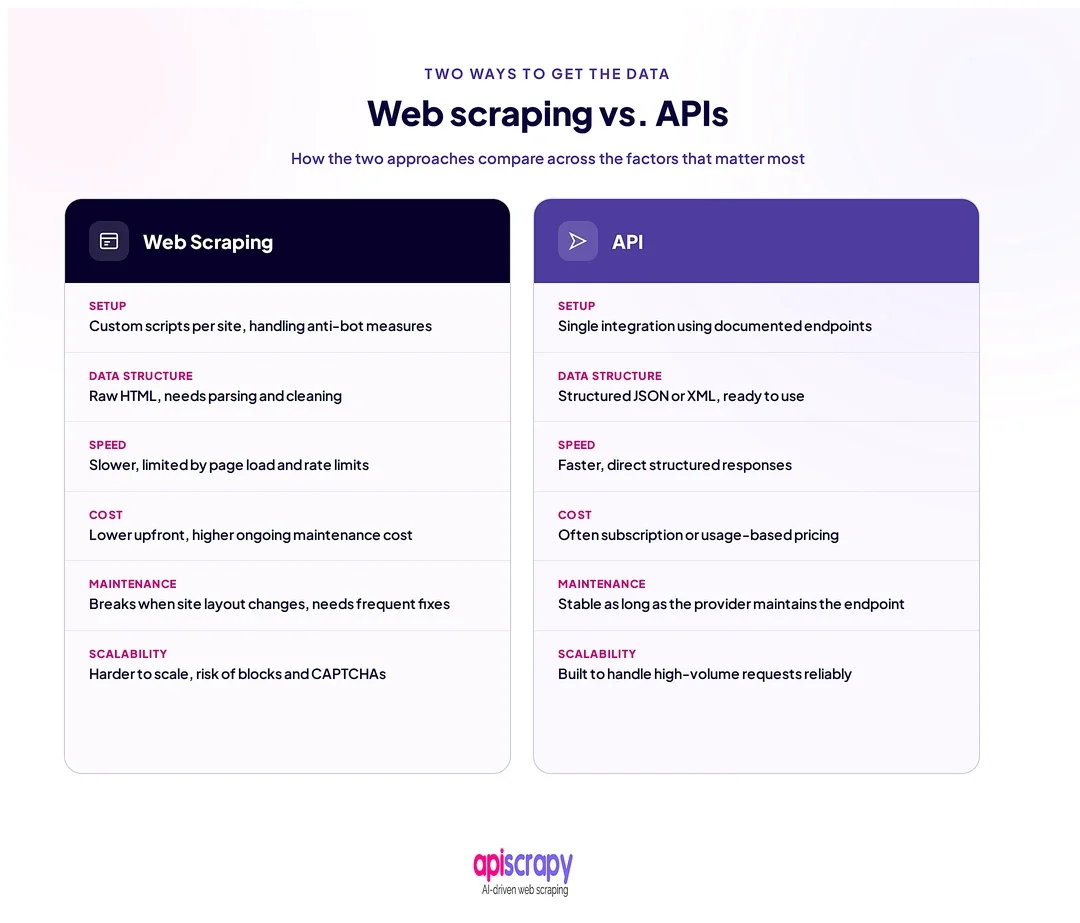
| Aspect | Web Scraping | API | Best For |
|---|---|---|---|
| Data source | Any public webpage | Endpoints the provider chooses to expose | Scraping for broader coverage |
| Setup effort | Higher: selectors, parsing, anti-bot handling | Lower: authenticate and call | APIs for faster setup |
| Output structure | Unstructured HTML, needs parsing | Structured JSON or XML by default | APIs for clean data |
| Speed at scale | Slower, page by page | Faster, built for volume | APIs for high-frequency calls |
| Cost at scale | Proxy, infrastructure, and upkeep costs | Usage-based or subscription fees | Depends on data volume |
| Legal and ToS exposure | Higher, varies by target site | Lower, governed by clear terms | APIs for lower legal risk |
| Maintenance burden | Ongoing, breaks when sites redesign | Low, provider maintains the schema | APIs for long-term stability |
| Real-time access | Possible, but resource-intensive | Often purpose-built for live data | APIs for real-time feeds |
When Web Scraping Is the Better Choice?
Web scraping earns its place when no API exists, or when the one on offer leaves the exact data you need. It is the only option when a provider has no interest in giving structured access to its content.
Common scenarios include:
- Tracking competitor prices across dozens of retailers with no shared API
- Pulling product reviews, specs, or availability from public listing pages
- Aggregating data scattered across many small, unrelated websites
Scraping’s real advantage is flexibility. It adapts to any page layout and does not depend on a vendor’s data model, release schedule, or willingness to share a field.
That flexibility comes at a price. Sites change their markup, deploy anti-bot defenses, and rate-limit aggressively, so scraping pipelines need active maintenance to keep working. Practitioners who run scraping at scale describe it less as little as build and keep tending.
When an API Is the Smarter Choice
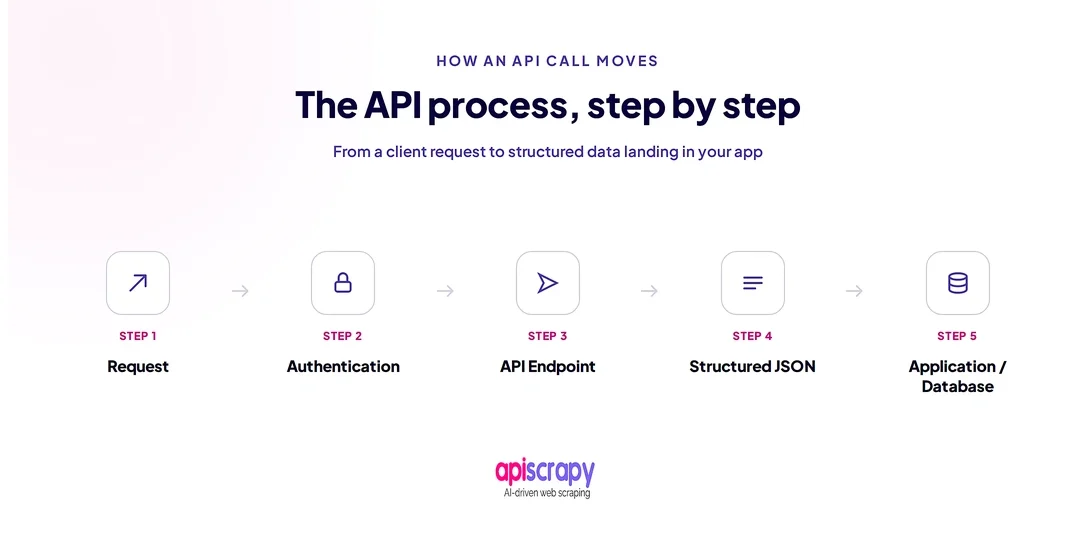
An API is the smarter pick when the data owner already offers a clean, documented, sanctioned way in. It removes the guesswork of parsing HTML and replaces it with a predictable contract.
Common scenarios include:
- Pulling real-time data such as stock levels, exchange rates, or shipping status
- Integrating transactional data where accuracy and uptime matter more than coverage
- Building production features that need a stable schema over years, not weeks
APIs trade flexibility for stability. Versioning, documentation, and support mean fewer surprises once the integration is live, which matters once data access becomes business-critical rather than exploratory.
The trade-off is control. You are limited to whatever fields, rate limits, and pricing tiers the provider decides to offer, and licensing terms can restrict how you use the data afterward.
How Do Web Scraping and APIs Compare in Cost and Performance?
Cost of Implementation and Scale
Scraping costs shift toward infrastructure: proxies, headless browsers, and engineering time to handle breakage. APIs shift cost toward usage fees, which scale predictably but can climb fast at high volume.
Speed and Real-Time Performance
APIs are generally faster per request since they skip HTML rendering and parsing. Scraping can still deliver near real-time data, but every added anti-bot defense adds latency.
Infrastructure and Maintenance Overhead
Scraping requires ongoing upkeep: rotating proxies, updating selectors, and monitoring for blocks. APIs push most infrastructure work onto the provider, in exchange for less control over that infrastructure.
Scalability Across Data Volume
Scraping scales linearly with sites targeted and often needs more infrastructure per new source added. APIs scale within their published rate limits, which is predictable but sometimes a hard ceiling.
Reliability and Uptime
API uptime is generally covered by a provider SLA, which scraping targets rarely offer. Scraping reliability depends entirely on how well a pipeline adapts to changes on someone else’s website.
What Are the Compliance and Legal Risks to Consider?
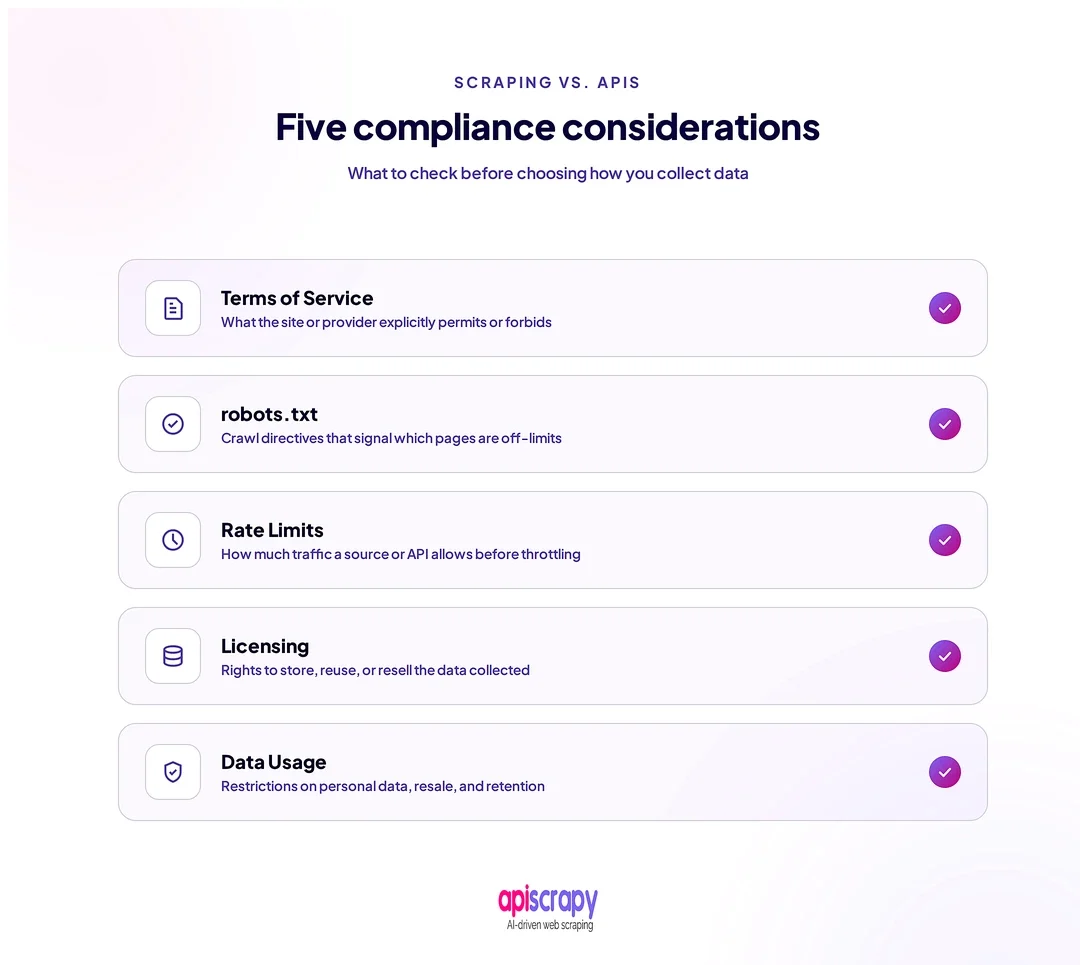
Legal exposure differs sharply between the two approaches, and the gap widens at scale. Both methods carry risk, but the nature of that risk is different.
For web scraping, the well-known hiQ Labs v. LinkedIn case shaped much of the current thinking. Courts found that scraping publicly available data does not by itself violate the Computer Fraud and Abuse Act, but a website’s own user agreement can still make scraping a breach-of-contract issue. The case ended in a settlement after LinkedIn showed hiQ had also used fake accounts to reach non-public data, which shows outcomes often hinge on specific conduct, not the act of scraping alone.
For APIs, the main risks sit in licensing terms and rate-limit agreements. Overstepping a usage tier, reselling data without permission, or ignoring attribution requirements can breach a contract even when the technical access was fully authorized.
Practical steps that reduce risk either way:
- Review a target site’s Terms of Service and robots.txt before scraping
- Keep API usage inside published rate limits and license terms
- Document where every dataset came from and how it may be used
- Avoid logging into accounts solely to reach data behind a login wall
Neither method is inherently illegal. Due diligence, not the method itself, is what determines legal exposure.
Key Features and Real-World Use Cases of Web Scraping and APIs
Key Features of Web Scraping
- Works on any public page, regardless of whether the owner offers an API
- Extracts exactly the fields visible on the page, not just what a provider chooses to expose
- Adapts to custom or unusual site layouts without vendor cooperation
- Scales horizontally across many unrelated sources at once
- Captures visual and unstructured content that structured APIs typically omit
Key Features of APIs
- Returns clean, structured data with no parsing required
- Comes with documentation, versioning, and predictable schemas
- Often backed by an uptime SLA and dedicated support
- Enforces rate limits that protect both provider and consumer from overload
- Easier to integrate into production systems with long-term stability needs
Real-World Use Cases
- Price monitoring across unlisted retailers with no shared API: scraping
- Payment processing or shipping status updates: API
- Aggregating job listings across small regional boards: scraping
- Pulling weather or currency data into an app: API
- Competitive intelligence across a fragmented market: scraping, often at scale
Conclusion
The choice rarely comes down to which method is better in the abstract. It comes down to whether your data is exposed through a sanctioned API, and whether your project can tolerate scraping’s upkeep or needs an API’s stability instead book a demo with APISCRAPY.
Many mature data teams end up using both, scraping where no API exists and calling APIs where one does. If your project spans both needs, a managed platform can absorb the maintenance burden either way.
FAQs About Web Scraping vs API
What is web scraping?
Web scraping is the automated extraction of data directly from a website's pages, rather than through a channel the site owner built for that purpose. It typically involves fetching a page's HTML and parsing out specific fields, such as prices or listings.
What is a web scraping API?
A web scraping API is a managed service that handles proxies, browser rendering, and anti-bot bypassing on your behalf, returning structured data instead of raw HTML. It combines the coverage of scraping with an API-like integration experience.
How do scraping APIs avoid blocks and CAPTCHAs?
They rotate residential and mobile IPs, mimic real browser fingerprints, and manage session behavior to avoid triggering anti-bot scoring systems in the first place. Modern anti-bot systems typically trigger a CAPTCHA only once a request's combined signals look automated.
Does web scraping need an API?
No, scraping can be done directly against a website without any API involvement, using tools like headless browsers or HTTP libraries. Many teams use a scraping API layer anyway, since it removes the need to manage proxies and browser infrastructure themselves.
Will JavaScript-heavy websites break my scraper?
Yes, if your scraper only fetches raw HTML, since JavaScript-rendered content will not appear in that initial response. Using a headless browser or a scraping tool with rendering support solves this by executing the page's scripts before extraction.