A Complete Guide to Automated Data Extraction
- Automated data extraction uses software to pull data from websites, documents, and emails and deliver it as clean, structured records, so nobody has to copy and paste again.
- How it works: connect to a source, capture the data, validate it, then deliver it as CSV, JSON, or an API feed.
- Why teams switch: results arrive faster and more consistent, and Gartner puts the cost of poor data quality at $12.9 million a year per organization.
- Manual or automated: manual works for one-off jobs; anything that repeats belongs in automation.
- When to go managed: when site changes and upkeep eat your week, a managed service like APISCRAPY takes over.
Automated data extraction is what frees your finance team from retyping invoice totals at month-end. It also spares pricing analysts from copying competitor prices by hand, only to find the numbers are already stale.
Logistics, insurance, and research teams face the same loop: smart people stuck doing work a machine should handle. With the right setup, websites, documents, and emails turn into clean, structured data on a schedule. This guide shows how it works, what it replaces, and how to choose the right approach for your team.
What Is Automated Data Extraction?
Automated data extraction is the use of software to collect data from sources such as websites, documents, emails, and databases, and convert it into a structured format with little or no human effort.
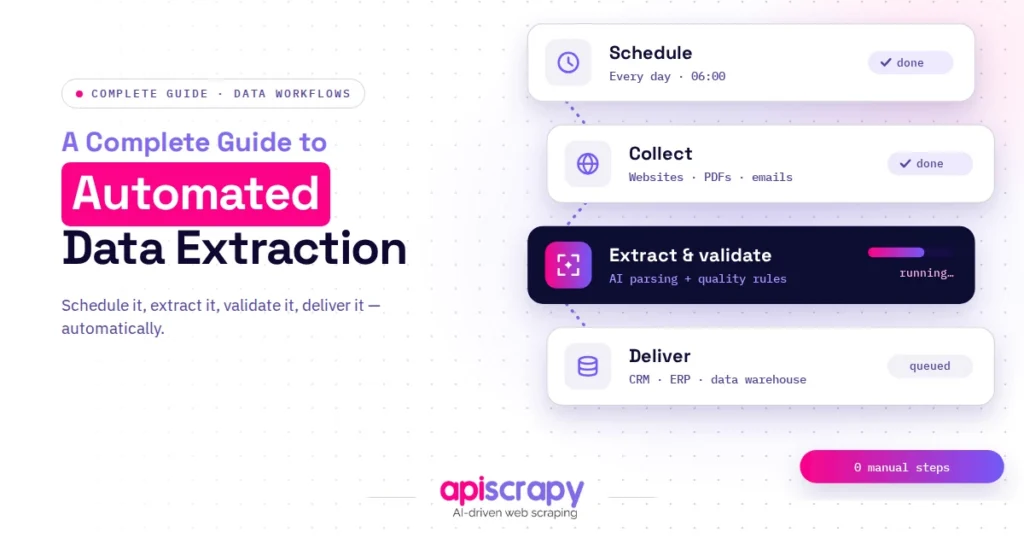
In practice, the software connects to a source, reads the content, recognizes the fields that matter, checks them for errors, and delivers the result to a spreadsheet, database, or API on a schedule.
Finance, ecommerce, logistics, insurance, and research teams use it most. Think of a pricing team tracking competitor prices daily, or an accounts team turning hundreds of invoices into ledger entries.
The need is growing because the volume of data created each day keeps rising, while the number of people available to process it by hand does not.
Types of Data for Automated Extraction
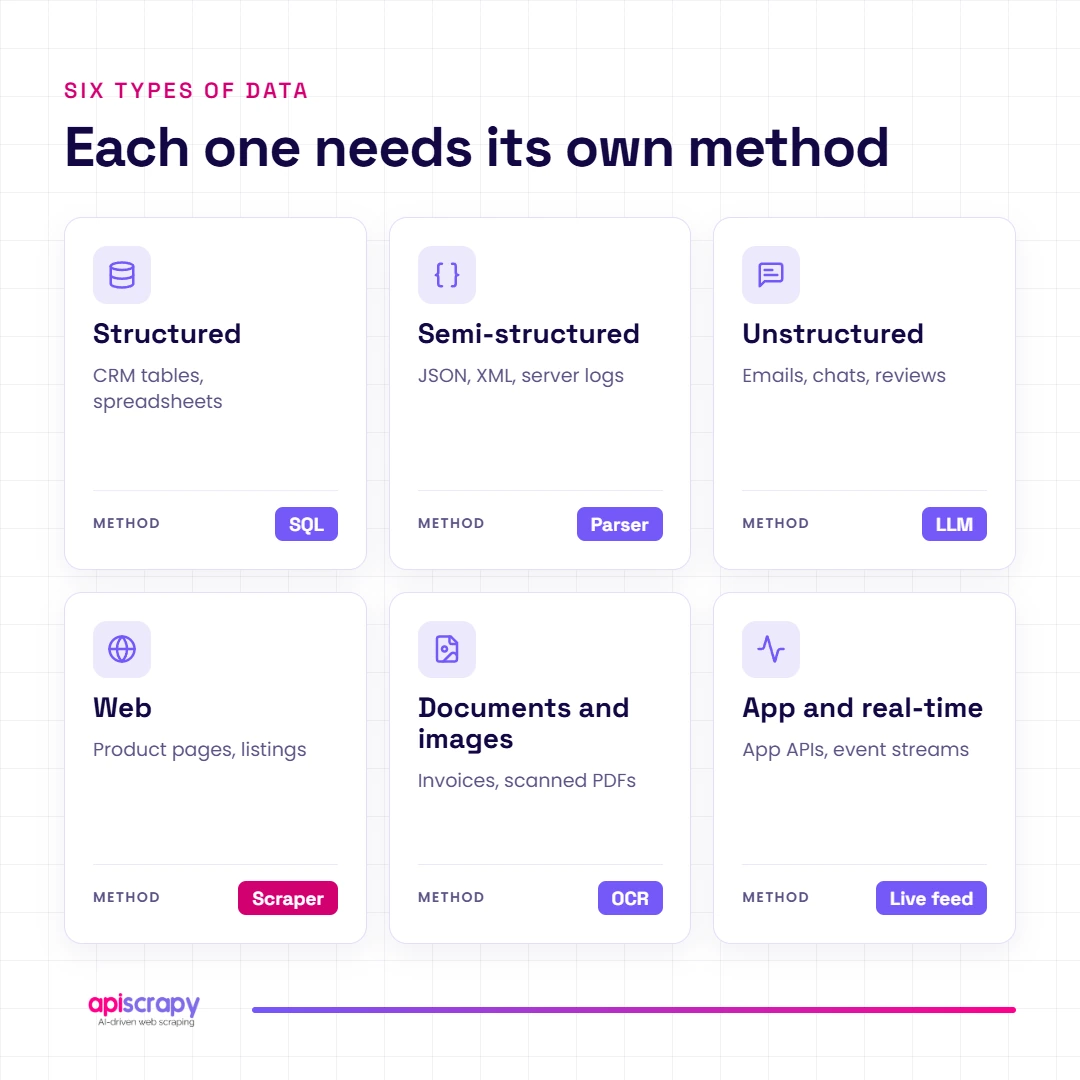
Data comes in different shapes, and each shape calls for a different extraction approach.
- Structured data: database tables and spreadsheets. Easy to read, but often locked inside separate systems.
- Semi-structured data: JSON, XML, and HTML tables. The fields are tagged, but layouts vary from source to source.
- Unstructured data: emails, contracts, and free text. Extraction here relies on language models to find meaning.
- Web data: prices, listings, reviews, and job posts. The challenge is layout changes, JavaScript, and blocking.
- Documents and images: invoices, forms, receipts, and scanned PDFs. OCR must read them before any field can be extracted.
- App and real-time data: feeds, dashboards, and mobile app content. It changes constantly, so timing matters.
The Tools and Technologies Behind Automated Data Extraction
No single technology does everything. Real projects combine several, depending on the source.
- Web scraping and crawling: automated requests and browsers collect data from websites at scale, including JavaScript-heavy pages.
- OCR and intelligent document processing: optical character recognition reads scans and PDFs, then models map text to fields such as invoice number or total.
- Natural language processing and LLMs: language models pull entities, dates, and clauses out of emails, contracts, and reports.
- Machine learning and computer vision: models learn layouts, so extraction keeps working when formats shift slightly.
- APIs, ETL pipelines, and workflow automation: these move clean data into databases, BI dashboards, and business systems.
You can build this stack in-house, buy a single-purpose service, or use a managed data extraction service. In-house gives control but demands engineering time. Managed services trade some control for speed and lower maintenance.
Benefits of Automated Data Extraction
The gains show up in three places: time, accuracy, and trust in the numbers. The last one matters most, because Gartner research puts the average cost of poor data quality at $12.9 million a year per organization.
- Speed: jobs that took a team days run in minutes, and they can repeat hourly or daily without anyone remembering to start them.
- Accuracy and consistency: software applies the same rules to every record, so typos and skipped rows largely disappear.
- Scalability: going from 100 records to 100,000 is a capacity setting, not a hiring plan.
- Lower long-term cost: setup takes effort, but recurring manual hours drop sharply once the workflow is stable.
- Fresher data: scheduled extraction keeps prices, stock, and listings current, so decisions rest on today’s picture, not last month’s.
How Is Automated Data Extraction Different from Manual Data Extraction?
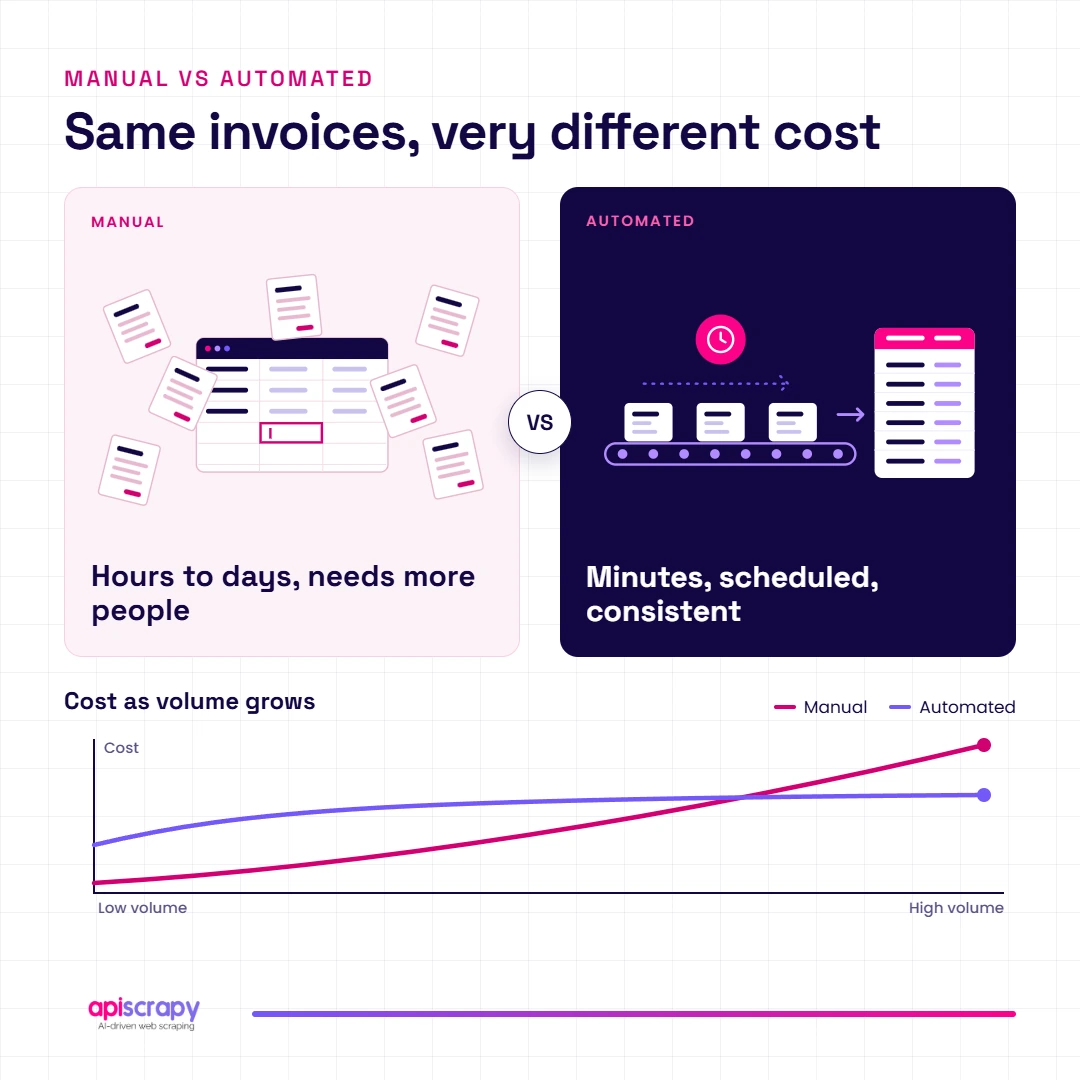
Manual extraction relies on people; automated extraction relies on repeatable rules. That one difference changes everything below.
| Factor | Manual Extraction | Automated Extraction |
|---|---|---|
| Speed | Hours to days | Minutes |
| Accuracy | Varies by person and fatigue | Consistent rules |
| Scalability | Needs more people | Needs more capacity |
| Long-term cost | Grows with volume | Flattens after setup |
| Consistency | Formats drift | Standard output |
| Data freshness | Updated occasionally | Scheduled updates |
Manual work still makes sense for a one-off task with a handful of records. Once the task repeats, automate.
The Hidden Challenges of Manual Data Extraction
Manual work looks cheap because the cost never appears on one invoice. It hides in rework, delays, and tired teams.
- Human error and rework: a mistyped digit in an invoice or price sheet travels downstream, and fixing it later costs far more than catching it early.
- Slow turnaround: by the time a weekly report is finished, some of the data is already out of date.
- Hidden labor cost: skilled analysts end up copying and pasting instead of analyzing.
- Bottlenecks at scale: every new source or region adds hours, so growth stalls behind data entry.
- Compliance gaps and burnout: repetitive work is hard to audit, and it wears people down.
If any of these sound familiar, the problem is not your team. It is the process.
How Automated Data Extraction Works
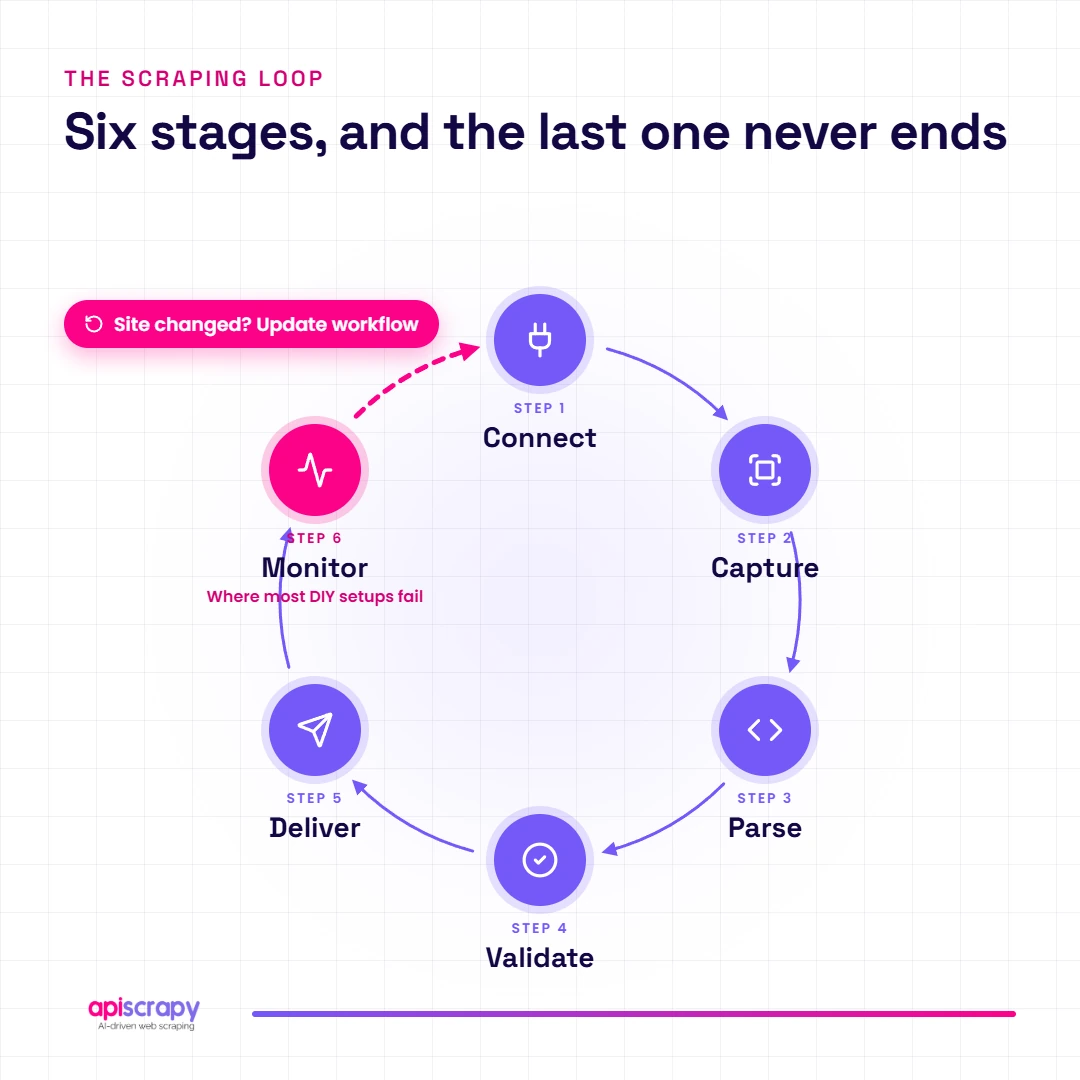
Whatever the source, the process follows the same six stages.
- Identify and connect to the source. Point the workflow at a website, document folder, inbox, or system.
- Capture the data. Download the page or file, using a browser for dynamic pages and OCR for scans.
- Parse and recognize fields. Rules or models locate the values you need, such as price, date, or invoice total.
- Validate and clean. Check formats, remove duplicates, and flag missing or suspicious values.
- Structure and deliver. Send the result as CSV, JSON, an API feed, or a database table.
- Monitor and maintain. Track failures, and update the workflow when a source changes its layout.
Here is a compact Python example that covers stages 2 to 5 for a web page. It uses books.toscrape.com, a practice site built for scraping:
import time

import requests

import pandas as pd

from bs4 import BeautifulSoup

def fetch(url, retries=3):

for attempt in range(retries):

try:

r = requests.get(url, timeout=15)

r.raise_for_status()

return r.text

except requests.RequestException:

time.sleep(2 ** attempt)

raise RuntimeError(f"Failed to fetch {url}")

def parse(html):

soup = BeautifulSoup(html, "html.parser")

return [

{

"title": item.h3.a["title"],

"price": item.select_one("p.price_color").text,

}

for item in soup.select("article.product_pod")

]

def validate(df):

df["price"] = (

df["price"]

.str.extract(r"(\d+\.\d+)")[0]

.astype(float)

)

return df.dropna().drop_duplicates(subset="title")

html = fetch("https://books.toscrape.com/")

df = validate(pd.DataFrame(parse(html)))

df.to_csv("output.csv", index=False)
Real-world tip: stage 6 is where most do-it-yourself setups fail. A script that runs perfectly on day one can quietly break the week a site changes its layout. Plan for monitoring from the start, or hand it to a managed service.
Why Choose APISCRAPY for Automated Data Extraction?
APISCRAPY suits teams that need reliable, structured data but do not want to build or babysit extraction workflows. That includes operations, pricing, research, and data teams with more sources than engineers.
It is a managed data extraction service from AIMLEAP. The service handles collection, cleaning, and delivery, so your team receives ready-to-use data instead of maintenance tickets.
- Fully managed delivery: the service builds, runs, and repairs the extraction, so site changes do not land on your desk.
- No-code setup: business users can request and receive data without writing scrapers.
- AI-augmented extraction: automation handles the routine work, and data is classified and structured before delivery.
- Flexible output: data arrives as CSV, JSON, Excel, or API feeds, on a schedule that fits your reporting.
- System integrations: it delivers into databases and business systems your team already uses.
Compared with in-house builds, the biggest difference is time. You skip infrastructure, monitoring, and rework. Clients have described the team’s attention to detail on complex datasets in reviews on Clutch.
Example scenario: a pricing team with no spare engineers
A retail pricing team tracked competitor prices across dozens of stores using spreadsheets and weekly manual checks. Reports arrived late, and errors kept slipping in.
After moving to a managed extraction service, the team received scheduled, structured price files and spent its time on decisions, not collection.
Start Building Your Web Crawler Today
Conclusion
Automated data extraction replaces slow, error-prone copying with clean, scheduled, structured data. The right approach depends on your data type, volume, and how much maintenance your team can carry.
Start with a small workflow you can measure, then scale it, or hand it to a managed service once upkeep becomes the bottleneck.
Ready to stop copying data by hand? Book a demo today. with APISCRAPY
Frequently Asked Questions About Automated Data Extraction
How does AI improve automated data extraction?
AI reads messy layouts and free text, so extraction keeps working when formats change. It also flags low-confidence values for review.
Can automated data extraction handle large volumes of data?
Yes. Automated workflows scale by adding capacity, and they can process thousands of pages or documents on a schedule.
How accurate is automated data extraction?
Accuracy depends on source quality and validation rules. Clean, consistent sources reach very high accuracy, and human review of flagged records closes the gap.
Can automated data extraction integrate with APIs, databases, and business systems?
Yes. Extracted data can flow into databases, BI dashboards, CRMs, and ERPs through APIs, scheduled files, or direct connections.
How much does automated data extraction cost in the USA?
Self-serve services start at roughly $25 to $500 a month, while managed services often run $2,000 to $20,000 a month. Volume, source complexity, and frequency drive the price.